

How to Add Loops in Automation Workflows
Every workflow has a lifecycle. It starts, runs through a set of steps, and stops. That model works perfectly when you are acting on a single piece of data — one form submission, one webhook hit, one new row.
But what happens when the action needs to vary based on what happened the last time the workflow ran? What if you need to distribute work across multiple resources in rotation — and each run needs to pick up exactly where the previous one left off?
That is where most automation builders hit a wall. And that is exactly the problem loops, combined with persistent state, are built to solve.
What is a Loop in a Workflow?
A loop is a construct that lets a workflow repeat the same set of actions across multiple items or across multiple runs — with logic controlling what happens each time. The workflow triggers once. The loop handles the repetition, and if needed, remembers what it did so the next run can continue intelligently.
Where Loops Are Actually Needed
Loops are not just for processing a long list. The more interesting use cases involve per-item logic — where each item drives a different outcome — or stateful repetition — where the workflow needs to remember what it did last time.
Round-robin assignment — You have five support agents. Every time a new ticket comes in via webhook, it should be assigned to the next agent in rotation. Agent 1 gets ticket 1, Agent 2 gets ticket 2, and so on — cycling back to Agent 1 after Agent 5. Each webhook hit is a separate workflow run. The loop needs to know which agent was assigned last time to decide who gets it this time.
Alternate sender rotation — You have three email IDs and want to send outgoing emails from each one in rotation so no single domain gets flagged for volume. Webhook fires, workflow runs, sends from Email ID A. Next hit — Email ID B. Next — Email ID C. Then back to A. Without memory of which ID was used last, this is impossible to automate correctly.
Even-odd processing — You want to apply two different actions to incoming data alternately. First item goes through Process A, second item through Process B, third through Process A again. The loop needs to track the count to know which process applies next.
Per-item conditional logic — An API returns an array of records. Each record has a different status field. The loop checks each record's status independently and takes a different action based on what it finds — not the same action for every item.
Row-by-row data processing — A Google Sheet has 200 rows of customer data. Each row needs to be validated, enriched via an API call using that row's specific fields, and pushed to a CRM. The loop processes each row independently so one bad row does not block the others.

The Problem Loops Alone Cannot Solve
Here is something that trips up most people building loop workflows for the first time.
Each workflow run is completely isolated. When a webhook hits and your workflow runs, it starts fresh. It has no awareness of anything that happened in a previous run — which item was last processed, which sender was used, which agent was last assigned. When the workflow ends, that context disappears.
This is fine for simple list processing where every item gets the same treatment. But for round-robin, alternate rotation, or even-odd logic — you need the workflow to remember.
The solution is persistent storage. Before the workflow ends, you write the current state to a data store. The next time the workflow runs, the first thing it does is read that store to find out where it left off. Then it acts accordingly, updates the store, and exits.
Without this, every run starts from zero. Your round-robin always assigns to Agent 1. Your email rotation always sends from ID A. The logic is structurally correct but behaviorally broken.
How Memory Connects to Loops
Most automation platforms provide some form of persistent storage for exactly this reason. The pattern is always the same regardless of the tool:
Workflow starts
Read from the data store — what happened last time?
Use that value to decide what to do this time
Execute the action
Write the updated state back to the data store
Workflow ends
Next run, step 2 picks up the updated value and the cycle continues correctly.
In viaSocket, this is done using a built-in tool called Memory.
What is Memory in viaSocket?
Memory is a storage tool that comes built into viaSocket — you don't need to set up any external database or connect a third-party app. Think of it like a sticky note that your workflow can write on before it finishes, and read from when it starts again.
You can search for it directly inside the workflow builder by typing "Memory" in the Add a Step panel:

Memory uses MongoDB behind the scenes and supports four basic operations: Create, Read, Update, and Delete. For most loop use cases, you'll mostly use Read and Update.
Here's a simple example: say you want to rotate emails across three sender IDs.You create a Memory variable called last_sender_index and set its starting value to 0. Each time the workflow runs, it reads that number, picks the matching sender, sends the email, adds 1 to the index, and saves it back. When the index hits 3 (the end of your list), it resets to 0. That's a clean rotation — no spreadsheet, no database, no manual tracking.
You can also use Memory inside a Loop's "Do" block to update records as the loop processes each item:

Here, the workflow is looping through Google Sheet rows and updating each MongoDB record using body."data".0."id" as the Document ID — a value that changes with every iteration of the loop.
→ Learn more about Memory in the viaSocket Help Docs

Step-by-Step: Building a Workflow
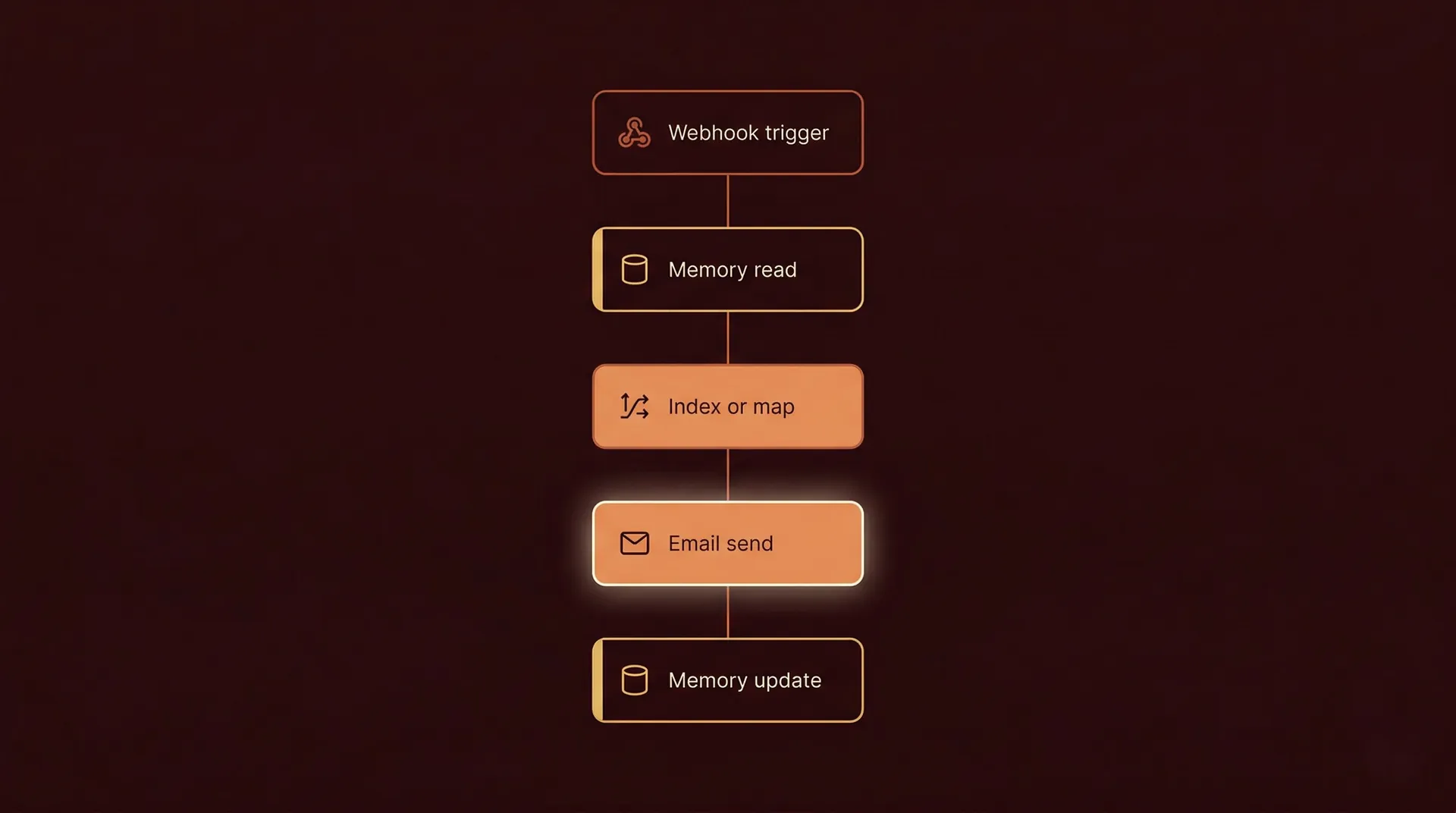
This example sends outgoing emails from three different sender IDs in rotation. Every time a webhook fires, the next sender in the list is used.
Step 1 — Set the trigger. A webhook receives incoming data — a new lead, a form submission, a CRM event. This fires the workflow.
Step 2 — Read from Memory. The first action step reads the current sender index from persistent storage. If this is the first ever run, the value is 0.
Step 3 — Map the current sender. Use the index value to select the corresponding sender from your list. Index 0 = Sender A, Index 1 = Sender B, Index 2 = Sender C.
Step 4 — Send the email. Execute the email action using the selected sender ID and the incoming webhook data for recipient details.
Step 5 — Update the index. Increment the index by 1. If it reaches the end of the list, reset it to 0. Write the updated value back to Memory.
Step 6 — End. Workflow exits. Next run will read the updated index and continue the rotation correctly.
The loop here is not over a list within a single run — it is a loop across runs. Each execution is one iteration of the rotation. Memory is what connects them.
Read more
Common Mistakes in Loop and Stateful Workflows
Not initializing the Memory value — If Memory has no starting value and the first run tries to read it, the workflow will error. Always initialize your state variables before the first run.
Not handling the index reset — In a round-robin across five items, if you only increment and never reset, the index goes out of bounds on the sixth run. Build the reset condition explicitly.
Treating every repeat as a list problem — Not all loops iterate over arrays. Some iterate across time — across separate runs. Identify which type of loop you need before you start building.
Race conditions on high-frequency webhooks — If two webhook hits arrive within milliseconds of each other, both runs might read the same Memory value before either has written the update. For high-frequency scenarios, add a short delay or use an atomic update operation if your platform supports it.
No error handling after the action step — If the email send fails and the Memory update still runs, the index advances without a successful send. The next run skips that sender incorrectly. Handle action failures before updating state.
Real-World Example: Round-Robin Lead Assignment
A sales team has four account executives. Every time a new lead fills out a form, it should be assigned to the next AE in rotation — no manual intervention, no favoritism, no skipped assignments.
The workflow starts with a webhook trigger connected to the form. The first step reads a last_assigned_index value from Memory — currently storing 2, meaning AE 3 was last assigned.
The workflow increments to index 3, selects AE 4 from the list, creates a CRM record with AE 4 as the owner, and sends AE 4 a Slack notification with the lead's details.
It then writes index 3 back to Memory and exits.
Next lead comes in. Memory returns 3. Workflow increments to 0 (reset), assigns AE 1, updates Memory to 0, exits. The rotation continues cleanly across every run, every hour, every day — without any manual tracking.
Three Takeaways
A loop in an automation workflow is not always about iterating over a list in a single run — sometimes it is about maintaining a consistent pattern across separate runs, which requires persistent state.
Round-robin assignment, alternate rotation, and even-odd logic all need Memory — without it, every workflow run starts from zero and the pattern breaks.
The most common loop failures are not logic errors — they are missing state initialization, no index reset condition, and no error handling between the action step and the state update.

