How to Choose a Workflow Automation Platform That Scales & Thinks For You
Manual work is still one of the biggest hidden costs in growing SMBs. According to McKinsey Global Institute’s 2023 research, a large share of work activities across industries can already be automated using existing technology. Yet many operations teams still spend hours every week copying data between systems, chasing approvals, and fixing preventable errors.
The issue isn’t a lack of automation tools — it’s fragmentation. Most SMBs adopt point solutions that fix one workflow but fail to scale across departments. Sales automates one process, finance another, support another. Instead of creating efficiency, this patchwork adds complexity.
Choosing the right workflow automation platform is less about features and more about architecture. You’re deciding what infrastructure your company will build on for years. This guide shows how to evaluate platforms that scale, integrate deeply, and support intelligent orchestration — without locking you into fragile systems.
What Is a Workflow Automation Platform?
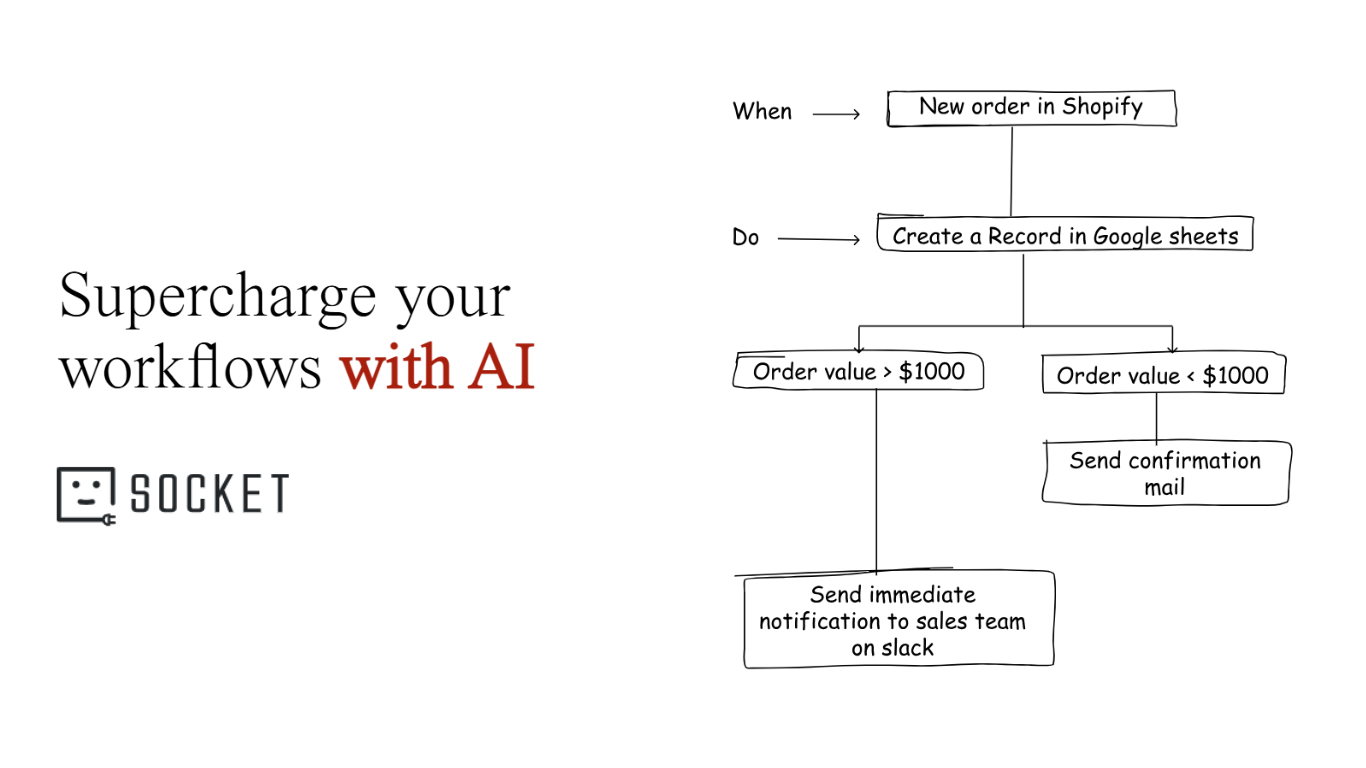
A workflow automation platform is software that connects your tools, data, and processes so work moves automatically across systems without manual intervention. Instead of employees pushing information from one app to another, the platform handles triggers, conditions, and actions behind the scenes.
Think of it as the operating system for your business processes. Your CRM, billing software, support tools, and spreadsheets are individual applications. The automation platform is the layer that makes them work together as a coordinated system.
This shift from task automation to orchestration is becoming industry standard. Gartner noted in its 2024 hyperautomation outlook that enterprises are moving away from isolated automation toward platforms that coordinate workflows end-to-end.
Modern orchestration also aligns with interoperability standards promoted by the W3C, which emphasize structured system communication and automation protocols.
For SMBs, this matters because growth multiplies complexity. Point tools don’t scale well. Platforms do. When automation is centralized, you build workflows once and reuse them across departments — onboarding, billing, approvals, support routing, reporting.
Why SMB Operations Teams Need Automation
According to McKinsey Global Institute’s 2023 automation analysis, up to 60% of work activities could be partially automated with current technology. For SMBs, that’s not theoretical — it’s operational survival.
Eliminate Repetitive Cross-Tool Work
Most teams operate in copy-paste mode: CRM → spreadsheet → email → ticket system. Every handoff adds friction.
Example: a new customer signs a contract. Someone manually enters billing data, provisions accounts, notifies onboarding, and assigns tasks. Automation converts that into one trigger that launches the entire sequence.
Benefits include:
No duplicate data entry
Faster onboarding cycles
Consistent customer experience
Reduced admin workload
See how real teams automate onboarding across departments:
customer onboarding automation workflows
Scale Without Hiring More Staff
Growth often exposes approval bottlenecks and coordination failures. Automated routing replaces slow email chains with structured decision flows.
Impact:
Faster approvals
Clear accountability
Predictable throughput
Reduced burnout
Automation allows SMBs to grow process capacity without growing headcount at the same rate.
Create Visibility Across Departments
Disconnected tools hide operational reality. Automation platforms unify workflows so every team sees shared status.
Sales → onboarding → finance → support can operate on one pipeline instead of separate silos. That visibility improves planning and reduces friction.
Reduce Human Error
Missed invoices, forgotten renewals, and lost tickets aren’t rare — they’re systemic. Automated reminders and triggers protect revenue and compliance.
Automation doesn’t replace people. It protects them from fragile systems.
Evaluation Criteria for Workflow Automation Platforms
Choosing a platform is a strategic decision. Forrester observed in 2023 that automation initiatives fail more often due to governance and platform mismatch than technology limits:
https://www.forrester.com/blogs/automation-success-requires-governance
Here’s what to evaluate.
Integration Depth
A platform is only as strong as its connectors.
Look for:
Open APIs
Webhooks
Legacy system support
Shallow integration forces manual work back into your process.
No-Code + Advanced Logic
Operations teams need visual builders. Developers need flexibility.
The best platforms support both drag-and-drop automation and advanced branching logic so workflows don’t outgrow the tool.
Scalability & Governance
Early-stage tools often break under complexity.
Evaluate:
Role permissions
Workflow versioning
Audit logs
Monitoring
Governance ensures automation scales safely.
Security & Compliance
Automation touches sensitive data.
Check for:
SOC 2 certification
Encryption standards
Access controls
Audit trails
Security is infrastructure, not a feature.
Pricing at Scale
Low entry pricing can hide exponential costs.
Watch for:
Task-based pricing traps
Connector fees
Execution limits
Support tiers
Predictable pricing matters more than cheap pricing.
Best Workflow Automation Platforms for SMB Scaling
No platform is perfect. Each serves different needs.
Zapier
Best for: simple cross-app automations
Key strength: massive connector ecosystem
Consider if: you need lightweight workflows
Make (Integromat)
Best for: visual workflow design
Key strength: flexible branching
Consider if: you want advanced customization
viaSocket (Featured Platform)
viaSocket’s workflow automation and MCP orchestration platform combines integration infrastructure with AI-driven orchestration. It supports 1000+ app connections, governance controls, and emerging AI standards.
Best for: intelligent cross-platform orchestration
Key strength: AI-native + scalable governance
Consider if: you want future-proof architecture
Anthropic’s official announcement of the Model Context Protocol explains how structured AI interfaces enable safer automation:
https://www.anthropic.com/news/model-context-protocol
n8n
Best for: developer-heavy teams
Key strength: extensibility
Consider if: you want open-source control
Microsoft Power Automate
Best for: Microsoft ecosystems
Key strength: Office integration
Consider if: your stack is Azure-centric
How Intelligent Orchestration Is Changing Automation
Automation is shifting from static rules to adaptive systems. MIT Sloan Management Review reported in 2024 that AI-enabled process platforms are evolving toward orchestration models that learn and improve over time.
Modern platforms rely on structured APIs similar to those described in the OpenAI function calling documentation, where workflows interact programmatically with services instead of manual triggers.
This is the next phase of automation: workflows that don’t just execute instructions — they make decisions.
You can see this direction in action inside
AI agents inside modern workflow automation
Build Smarter Workflows That Scale
Choosing a workflow automation platform is about infrastructure, not convenience. Integration depth, scalability, governance, and intelligent orchestration determine whether your system grows with you or forces a painful migration later.
The smartest next step isn’t reading another comparison list — it’s running a real pilot workflow. See how orchestration behaves under real conditions, across real departments.
Explore viaSocket demo and pricing to evaluate automation architecture in practice.
AI Workflow Automation Tool | viaSocket