
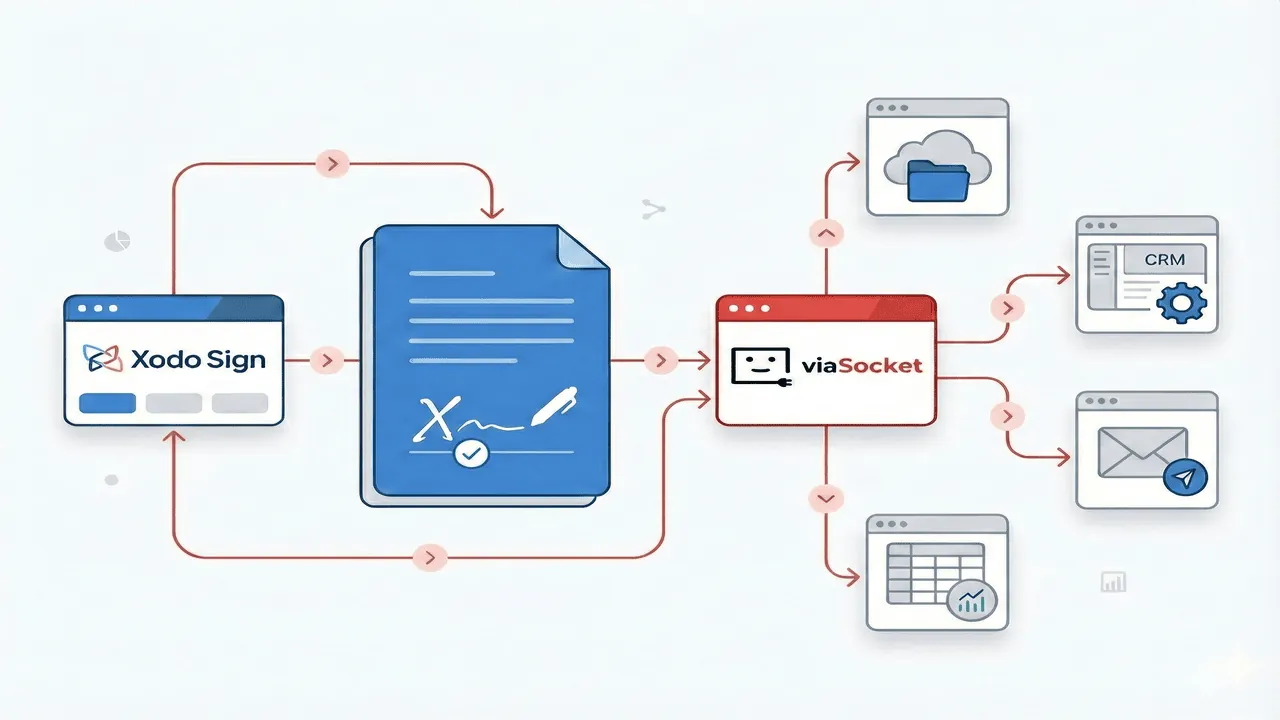
Xodo Sign Automation: Eliminate Manual Document Work
There’s a familiar frustration that comes with documents.
You have a document that needs a signature. Send it for signing, then wait. And wait. Then you manually remind the signer, update a spreadsheet, upload the signed copy somewhere else, and notify your team. None of this is hard—but all of it steals time.
Automation changes the rhythm completely. When a signing tool like Xodo Sign is connected to the rest of your tools through viaSocket, documents stop being tasks you manage and start becoming workflows that move on their own.
Xodo Sign by Apryse is an electronic signature software platform that lets you securely sign documents, request signatures from others, and track when a document is viewed, signed, or completed.
The Xodo Sign platform lets you add legally binding digital signatures and comes with built-in document editing tools and comprehensive audit trails that save time, cut costs, and keep work secure.
Ready to see how automation turns signing into a hands-off process?
Here are practical ways Xodo Sign and viaSocket work together to eliminate manual steps and keep your workflows moving.
Auto-send contracts when a deal is marked ready
Sales teams often lose momentum between “deal agreed” and “contract sent.” Someone has to notice the status change, prepare the document, and send it out. That gap costs time and sometimes the deal itself. With viaSocket automation, the moment a deal is marked ready in your CRM, you can use a trigger to send the contract automatically. No reminders. No delays. Just forward motion.
Save signed documents instantly to cloud storage
Downloading signed PDFs and uploading them to folders is quite, repetitive work. It also creates version confusion when someone forgets to upload the final copy.viaSocket watches for completed signatures in Xodo Sign and saves them directly to your cloud storage, named and organized exactly how you want. The document is there before anyone asks for it.
Notify teams the moment a document is signed
Teams shouldn’t have to keep checking dashboards to see if something is done. That’s busywork disguised as awareness. When a document is signed in Xodo Sign, viaSocket sends an instant notification to your team chat. Everyone knows exactly when to move forward, without chasing updates.
Create tasks automatically after signatures
Once a document is signed, the real work usually begins—onboarding, invoicing, delivery. Manually creating follow-up tasks slows that transition. Automation creates tasks the second a signature is completed, ensuring nothing slips through the cracks and work starts immediately.
Keep your CRM updated without manual edits
Updating records after every signed document sounds small until you do it dozens of times a week. It’s repetitive and error-prone. With viaSocket, your connected CRM is updated automatically—status changes, timestamps, and document links included. Your data stays accurate without manual cleanup.
Get advanced e-signing capabilities with Xodo Sign
When paired with viaSocket, Xodo Sign brings everything together in one streamlined process. Here’s more on what Xodo Sign brings to the table:
Legally recognized e-signatures
Stay in compliance with ESIGN (U.S.), UETA, and eIDAS (EU) regulations, ensuring your signed documents are valid across multiple regions.
Comprehensive PDF editing
Update text, remove sensitive details, insert images, and annotate directly on the PDF before sending it out for signatures.
Detailed audit trails
Monitor when a document is opened, signed, and finalized. Every action is logged for complete visibility.
Flexible multi-signer workflows
Assign roles, define signing order, and manage team approvals without creating separate files for each participant.
Robust document security
All signed files are safeguarded with 256-bit HTTPS encryption.
Support for multiple formats
Apply electronic signatures to PDFs, Word files, and image-based documents.
Seamless cloud integration
Connect with Dropbox, Google Drive, OneDrive, Salesforce, and other platforms to keep your files organized and accessible.
Tip: You can try the Professional plan with a free trial (no credit card required) and start exploring Xodo Sign’s advanced features for yourself.
Take Your Xodo Sign Workflows to the Next Level
Xodo Sign already simplifies signing. Automation takes it further—removing follow-ups, eliminating duplicate work, and creating workflows that scale as your business grows. This isn’t about speed alone; it’s about building systems that don’t depend on memory or manual effort.
Start automating in minutes with viaSocket!

