viaSocket MCP vs Zapier MCP — Which MCP Server Fits Your AI Stack?
 By Abhijeet Singh
Jump to section
- What Is an MCP Server?
- Zapier MCP: What It Is and How It Works
- viaSocket MCP: What It Is and How It Works
- Side-by-Side Comparison
- The Core Difference: Who Owns the MCP Server?
- When Zapier MCP Makes Sense
- When viaSocket Makes More Sense
- A Note on Integration Counts
- Setup Complexity: A Practical Comparison
- Pricing in Practice
- FAQ
- Which Should You Use?
viaSocket MCP vs Zapier MCP — Which MCP Server Fits Your AI Stack?
Both viaSocket and Zapier offer MCP servers that let AI agents call real app actions. They solve the same surface-level problem — "my agent needs to talk to external tools" — but they are built for different situations. Zapier MCP is designed for individuals and teams who already live in the Zapier ecosystem. viaSocket's MCP is built for developers and SaaS companies that need to embed AI action capabilities inside their own product.
This comparison covers what each server does, how they differ on coverage, pricing, setup, and embedded use, and the scenarios where each makes sense.
What Is an MCP Server?
Model Context Protocol (MCP) is an open standard that defines how AI models discover and call external tools. An MCP server exposes a list of tools — each tool is an action an AI agent can invoke, such as "send a Slack message" or "create a HubSpot contact." The agent queries the server for available tools, then calls whichever ones it needs.
Both Zapier and viaSocket implement MCP servers. What sits behind each server — the app catalogue, the auth layer, the pricing model, and the deployment architecture — is where they diverge.
Zapier MCP: What It Is and How It Works
Zapier MCP connects MCP-compatible clients (Claude, ChatGPT, Cursor, Grok Bot, VS Code, and others) to Zapier's catalogue of 9,000+ apps and tens of thousands of actions (40,000+ per Zapier's documentation). The auth layer is Zapier's existing OAuth connection system — the same credentials that power Zaps.
Key characteristics, verified from Zapier's MCP documentation and zapier.com/mcp:
- App coverage: 9,000+ apps, tens of thousands of actions (40,000+ per Zapier's documentation)
- Tool discovery modes: Two modes — agentic mode (the agent finds actions dynamically during conversation) and managed mode (you pre-select a fixed action set)
- Skills: Reusable workflows saved from conversation that can be reused across supported AI clients (Claude, ChatGPT, Cursor, Grok Bot, VS Code)
- Code Actions: The agent can write and run code for custom API calls or data transformations when no standard action fits
- Server sharing: Requires a Team or Enterprise plan; Tool bundles are available on any plan
- MCP transport: Streamable HTTP only — SSE (Server-Sent Events) is not supported
- Security: SOC 2 Type II certified; credentials stay in Zapier, not in the model
- Embed: Zapier has a documented MCP embed path — users authenticate via OAuth, developers capture a per-user server URL and call it with a Bearer token secret
Pricing (from zapier.com/pricing): Zapier MCP is included in every Zapier plan. Each successful tool call uses 2 tasks from your Zapier task quota. Failed calls do not count. The Free plan includes 100 tasks/month; the Professional plan starts from $19.99/month (billed annually) with configurable task tiers.
viaSocket MCP: What It Is and How It Works
viaSocket's MCP offering comes in two forms, which serve different audiences:
1. Public MCP Marketplace (viasocket.com/mcp) A public catalogue of MCP-compatible app integrations. Developers and AI builders can discover and connect apps through this marketplace.
2. White-label MCP for SaaS (viasocket.com/mcp/saas) Lets SaaS companies deploy a branded MCP server to their own users. The MCP endpoint is yours — your brand, your users' connections.
3. Embedded Actions for AI (viasocket.com/embed/actions-for-ai) viaSocket's primary product for AI agent builders. Developers embed a single script tag and JWT token into their product. Users connect their own apps, and those connections are immediately callable by the AI as tools — including as an MCP endpoint. Multi-step workflows built in viaSocket's visual builder become single AI tools.
Key characteristics:
- App coverage: 2,300+ apps (sourced from viasocket.com and viasocket.com/pricing; exact count pending internal confirmation)
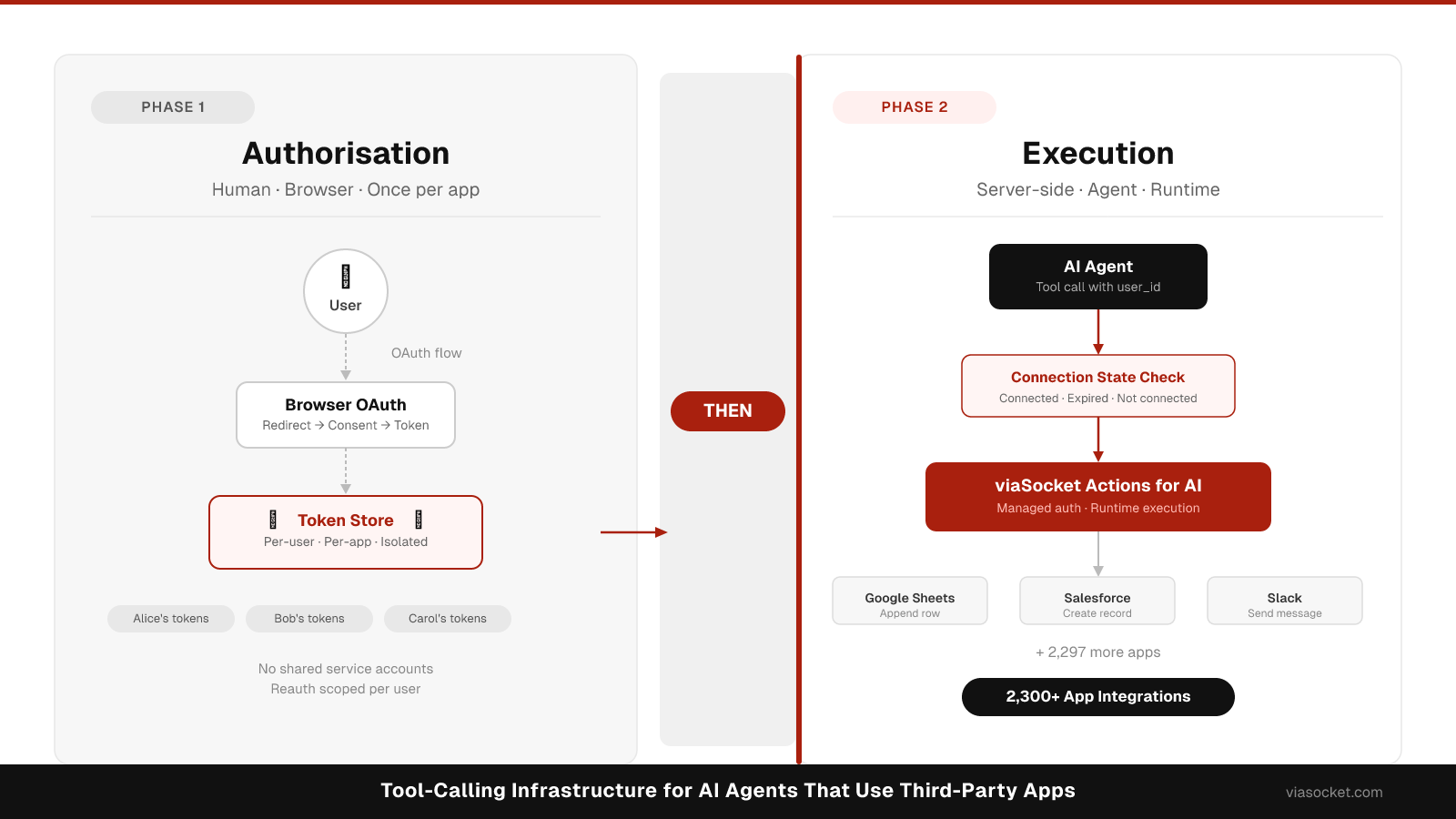
- Auth: Managed OAuth per user — handled by viaSocket; developers embed a signed JWT token per user. For more on how managed OAuth works at the per-user level, see Managed OAuth for SaaS Integrations.
- Multi-step workflows as single tools: A full multi-app workflow can be exposed as a single callable AI tool — no complex chaining required on the agent side
- Embed architecture: Single script tag + JWT payload; no separate OAuth infrastructure to build
- White-label: Available via /mcp/saas
- AI model compatibility: Works with OpenAI, Claude, Gemini, and any model supporting tool-calling or MCP
- Security: SOC 2 Type II, ISO 27001:2022, GDPR & CCPA compliant
- Pricing: Sandbox free (25 users, 25K tasks/month); Production $249/month (1,000 active users, 1M tasks); Enterprise custom. Overage: $1/user, $1/2,500 tasks. See viasocket.com/pricing.
Side-by-Side Comparison
| viaSocket | Zapier MCP | |
|---|---|---|
| App coverage | 2,300+ apps | 9,000+ apps |
| Primary audience | Developers building AI products; SaaS companies | Individuals and teams using Zapier |
| Embedded in your product | Yes — designed for this; single script + JWT | Possible via embed path, but users need Zapier accounts |
| White-label MCP | Yes (/mcp/saas) | No |
| Multi-step workflow as single AI tool | Yes — visual builder; one call runs full workflow | No — single actions only via MCP |
| Pricing model | Flat monthly (Sandbox free, Production $249/mo) | Per task on your Zapier plan (2 tasks per MCP call) |
| Auth managed for you | Yes — viaSocket handles per-user OAuth | Yes — Zapier handles credentials |
| Server sharing (multi-user) | Yes — multi-tenant by design | Team/Enterprise plan required |
| Supported AI clients | OpenAI, Claude, Gemini, any MCP-compatible model | Claude, ChatGPT, Cursor, Grok Bot, VS Code |
| Skills / saved workflows | Visual workflow builder; workflows become tools | Skills (saved conversation flows) |
| MCP transport | Streamable HTTP / MCP standard | Streamable HTTP only (no SSE) |
| Code Actions | Custom webhooks and actions supported | Yes — agent can write and run custom code |
| Security certifications | SOC 2 Type II, ISO 27001:2022 | SOC 2 Type II |
App counts are each vendor's own claims, sourced October 2026. Zapier documentation lists 40,000+ actions; zapier.com/mcp lists 66,000+ triggers and actions — both figures sourced from Zapier's own properties on the same date.
The Core Difference: Who Owns the MCP Server?
This is the most important dimension for AI builders to understand.
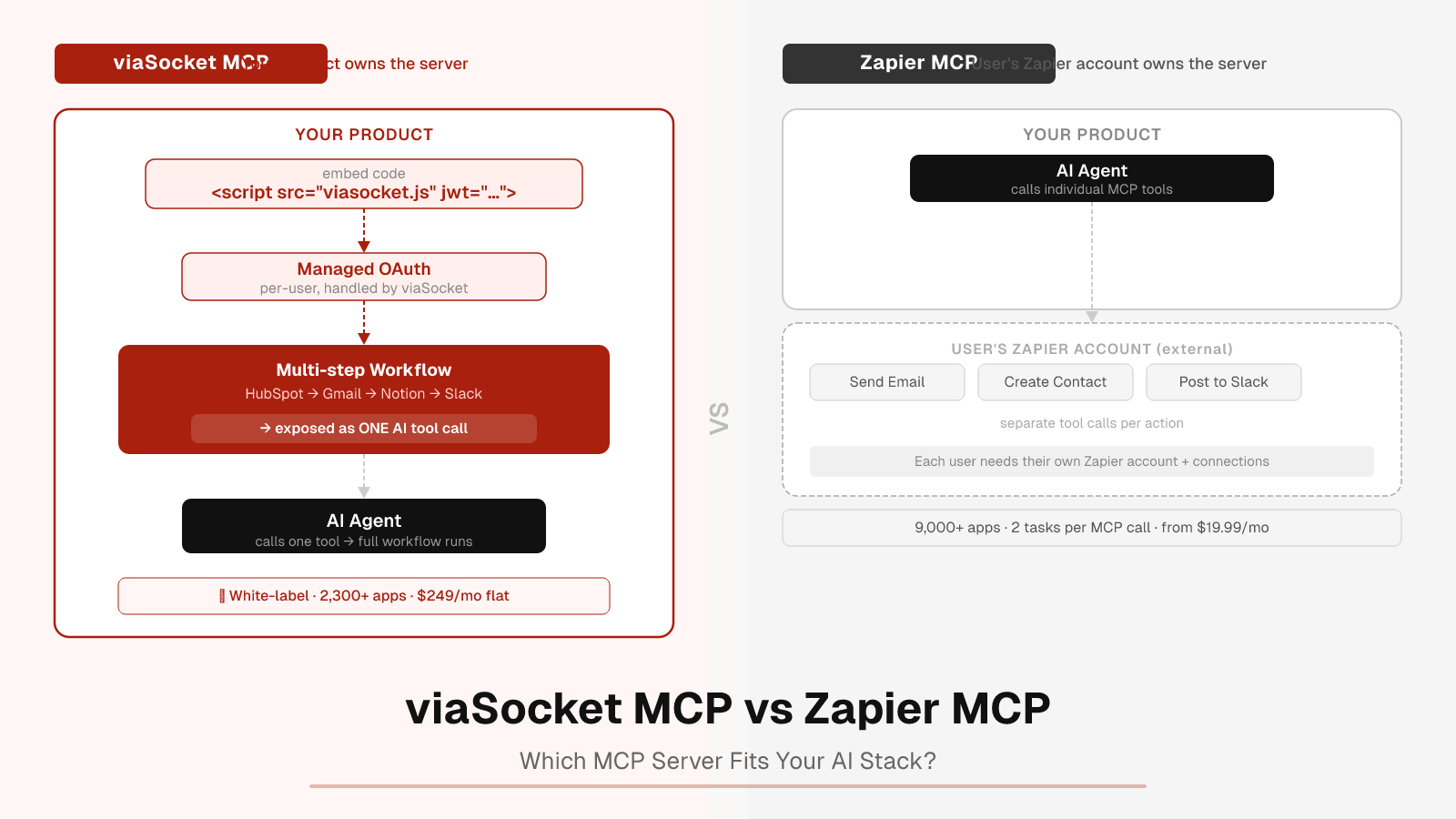
With Zapier MCP, the MCP server belongs to the Zapier account holder. When you embed it into your product, each of your users connects their own Zapier account. The tool catalogue is whatever actions they have set up in Zapier. This works well for internal tools and team productivity use cases. For a SaaS product shipping to many end users, it introduces a dependency: your users each need active Zapier accounts and connections, and Zapier's pricing applies to their usage.
With viaSocket's embed, your product owns the MCP server. Your users connect apps directly inside your product's interface — no Zapier account required. You control which apps are available, which tools are exposed, and how the auth is structured. The MCP endpoint belongs to your product. This model is built for multi-tenant SaaS deployment from the start.
When Zapier MCP Makes Sense
- You are a power user or team already on Zapier. Adding MCP to Claude, Cursor, or ChatGPT gives your existing Zap connections to your AI — zero additional auth setup.
- You want the broadest possible app catalogue. Zapier's 9,000+ apps is the largest ready-to-use catalogue for MCP. If a less common app your users need is only on Zapier, that matters.
- You are building an internal productivity tool, not a SaaS product. Zapier MCP is strong for individual and team use cases where each user manages their own Zapier account.
- You need Code Actions. The ability for the agent to write and execute custom code inline — for internal APIs or data reshaping — is a distinctive Zapier MCP capability.
When viaSocket Makes More Sense
- You are shipping an AI-powered SaaS product. Your users will never see or manage a Zapier account. viaSocket's embed puts the integration layer inside your product — one script tag, one JWT, and your users' app connections are immediately callable by your AI.
- You need multi-step workflows as single tools. If "onboard a new customer" means create a HubSpot contact, send a Gmail, update a Notion record, and post to Slack, you want that as one tool your AI calls — not four separate MCP actions. viaSocket's visual workflow builder makes this the default architecture.
- You want a white-label MCP server. viaSocket's /mcp/saas offering lets you deploy a branded MCP endpoint. Zapier does not offer white-label MCP.
- You want predictable per-product pricing. viaSocket's flat Production plan ($249/month for 1,000 active users and 1M tasks) is straightforward for a SaaS company budgeting per product. Zapier's task-per-call model can accumulate at scale when each MCP call costs 2 tasks.
- Your users should not need to leave your product to set up integrations. viaSocket's embed handles OAuth connection flows inside your product. Zapier's embed requires users to connect to Zapier's infrastructure.
A Note on Integration Counts
Zapier's 9,000+ app catalogue is larger than viaSocket's 2,300+. This is a real difference worth understanding:
- If your product primarily serves users of mainstream business apps (Gmail, Slack, HubSpot, Salesforce, Notion, GitHub, Jira), both catalogues cover the relevant territory.
- The breadth gap matters most for less common apps. In that scenario, Zapier's catalogue is a genuine advantage.
- viaSocket's catalogue is growing. The integration count on the public marketplace reflects a broader available set that continues to expand.
If app breadth is the primary decision factor, confirm which specific apps you need before choosing.
Setup Complexity: A Practical Comparison
Zapier MCP setup (individual/team use):
- Connect Zapier MCP at mcp.zapier.com
- Choose apps and actions (agentic or managed mode)
- Add the MCP server URL to your client (Claude, Cursor, etc.)
- Start issuing instructions
Total time: minutes for a single user already on Zapier.
Zapier MCP embed setup (for your product's users):
- Configure embed settings (company name, allowed domains)
- Generate and store an embed secret (Bearer token)
- Each user authenticates with their Zapier account via OAuth; capture their unique MCP server URL
- Use the server URL + Bearer token to call tools on the user's behalf
Total time: approximately 1–2 hours to wire up the integration flow (per viaSocket's comparison of the two approaches).
viaSocket Actions for AI embed setup:
- Sign in at viasocket.com — get your org_id, project_id, and embed_secret
- Generate a signed JWT payload per user (on your backend)
- Add the embed script tag to your frontend — users connect apps inside your product's UI
- Call the MCP endpoint with your embed token — all connected apps are now callable tools
Total time: approximately 30 minutes to initial working embed (per viaSocket's published setup guide at viasocket.com/embed/actions-for-ai).
The viaSocket approach requires no Zapier-side user account management. The trade-off is that you are building a tighter, product-owned integration layer rather than leveraging a network of existing Zapier connections.
Pricing in Practice
Zapier MCP:
- Free plan: 100 tasks/month total (Zaps + MCP combined). At 2 tasks per MCP call, that is 50 MCP calls on the Free plan.
- Professional: from $19.99/month (billed annually) — task tier configurable.
- MCP draws from the same task quota as everything else in Zapier.
viaSocket (Embed / Actions for AI):
- Sandbox: $0/month — 25 active users, 25K tasks/month
- Production: $249/month — 1,000 active users, 1M tasks/month
- Enterprise: Custom
- Overage: $1/user, $1/2,500 tasks
For a SaaS company with 200 active users making 5 MCP-driven actions each per month (1,000 calls total), viaSocket's Production plan at $249/month is a flat, predictable cost. On Zapier, 1,000 successful MCP calls = 2,000 tasks — which sits within a Professional plan tier, but alongside all other Zapier usage.
FAQ
Does Zapier MCP work if my users don't have Zapier accounts?
No. Each end user who connects apps via Zapier MCP needs their own Zapier account and must authenticate through Zapier. This is by design — Zapier manages credentials at the account level. If you need your users to connect apps inside your own product without signing up for a third-party service, viaSocket's embed is built for this.
Can I white-label viaSocket's MCP server?
Yes. viasocket.com/mcp/saas is built for SaaS companies that want to deploy a branded MCP endpoint. Zapier does not offer white-label MCP.
Does Zapier MCP support SSE (Server-Sent Events)?
No. Zapier MCP requires Streamable HTTP. MCP clients that only support SSE will not connect. This is documented in Zapier's MCP limitations.
Can viaSocket expose multi-step workflows as a single AI tool?
Yes. A workflow built in viaSocket's visual builder — even one that spans multiple apps — is exposed as a single callable tool. The agent calls one tool; viaSocket handles the orchestration across apps. Zapier MCP exposes individual actions through the MCP interface.
What happens if I hit my task limit on either platform?
On Zapier, paid plans switch to pay-as-you-go above the task limit unless you turn it off. On viaSocket's Embed plans, overage is $1/2,500 tasks. Check current plan terms at viasocket.com/pricing and zapier.com/pricing.
Which is better for an internal AI assistant versus a customer-facing AI product?
Zapier MCP is well-suited for internal tools where your team is already using Zapier — fast to connect, no infrastructure to build. For customer-facing AI products where your users should never see or touch a Zapier account, viaSocket's embed model is the better fit.
Which Should You Use?
If you are already on Zapier and want to give Claude or Cursor access to your existing app connections, Zapier MCP is the fastest path to working tool-calling — especially if you need access to the breadth of Zapier's 9,000+ app catalogue.
If you are building an AI-powered product and need to ship integration capability to your own users — with your branding, your auth flow, and multi-step workflows callable as single AI tools — viaSocket's MCP and embed approach is built for that architecture from the ground up.
Explore viaSocket's MCP options at viasocket.com/mcp, see the white-label SaaS offering at viasocket.com/mcp/saas, or get started with embedded AI tool-calling at viasocket.com/embed/actions-for-ai.
Sources: zapier.com/mcp, docs.zapier.com/mcp/home, zapier.com/pricing, viasocket.com/embed/actions-for-ai, viasocket.com/mcp/saas, viasocket.com/pricing. All figures sourced October 2026.
Publisher note: This article contains a 7-question FAQ section that qualifies for FAQ structured data (schema.org/FAQPage). Adding FAQ schema markup may improve rich result eligibility in search.